
Adobe’s Latest Gmail Add-On Allows You To Share Work Via Email Seamlessly
Image via Adobe
Adobe has launched a Gmail Add-on for users to seamlessly share their work through email. The new addition allows you to retrieve work from your Creative Cloud Assets, and attach public links to synced files, libraries and mobile creations on email.
Now, you can easily attach your works stored in the Creative Cloud into your Gmail message without having to leave the window. All of your files or assets created in Adobe’s lineup of applications such as Photoshop, Illustrator, Lightroom and more, will now be accessible from the Gmail window itself.
The plugin is already available on your Gmail compose page, and all you have to do is to click on the Creative Cloud icon located at the bottom of the message. Once clicked, the Add-on’s file browser will appear, allowing you to search your works and insert it onto your message. This is how the file browser will look like below.
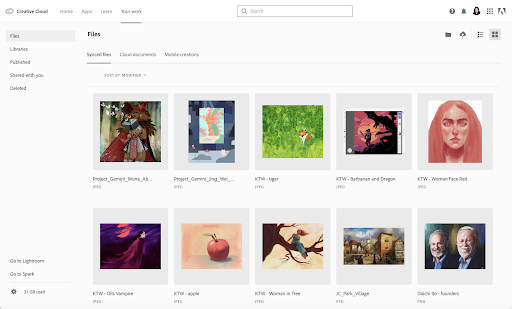
Since the current version only supports public links, you’ll be requested to set your private assets to “public” under privacy settings. The new function also enables you to save email attachments directly into your Creative Cloud account.
Together with @GoogleCloud, we're making it easier to share links to your creative assets with external teams using email! Learn how to get started with the Creative Cloud for @Gmail Add-on: https://t.co/EWQfk9XMQF
— Adobe Creative Cloud (@creativecloud) March 5, 2020
Adobe's new Gmail add-on makes it easier to share your work over email: https://t.co/kXnYuZ3ags pic.twitter.com/TpzMVj1IVD
— PetaPixel (@petapixel) March 5, 2020
[via Adobe, images via Adobe]
Also check out these recent news


