
Photoshop Lets You Plant & Grow Trees In Your Images With This Lesser-Known Tool
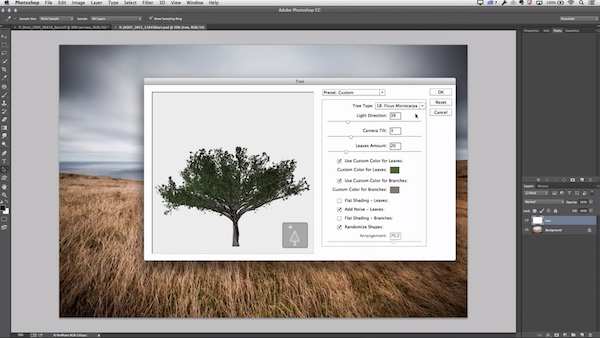
Video screenshot via Adobe Photoshop
Having been the choice photo-editing software for a good 30 years, Adobe Photoshop is one of those things where the deeper you dive, the more you’ll find. It might thus astonish users that it’s also a place for virtual gardening.
The lesser-known feature, shared by Input via Boing Boing, lets you insert 34 species of 3D-rendered trees into your photos, as well as gives you option to groom the foliage by adjusting their heights, leaf sizes, branch thickness, and more. The tool has been around for years, and Adobe even teased it as a “hidden gem” in a Photoshop tutorial published in 2014.
To launch the selection, you’ll simply have to click on ‘Filter’, then ‘Render’, and finally, ‘Tree’.
The feature was introduced to accommodate architectural artists who needed to include greenery in their projects. Prior to its release, users had to grab photos of trees captured at suitable angles and cut them out themselves before dropping them into their work.
The filter finally gave them a less clumsy option to seamlessly integrate trees into images, and then customize them to fit.
“By ‘fit,’ I mean it doesn’t have a strong style,” explained technical research artist Daichi Ito, who created the filter. “It’s somewhat realistic, but not photorealistic.”
[via Boing Boing, video and cover image via Adobe Photoshop]
Also check out these recent news


