
Adobe Adds Major Upgrades Including Ultra-Precise ‘Select Subject’ For Photoshop
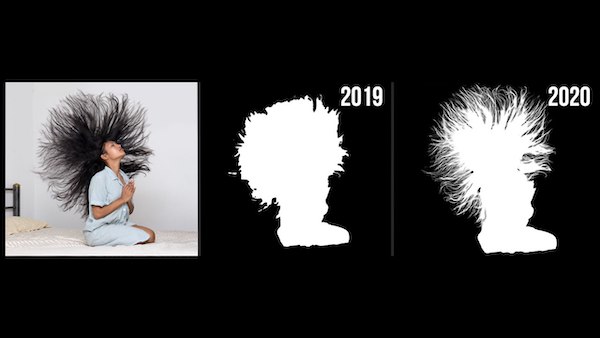
Image courtesy of Adobe
This week, Adobe added a lineup of significant upgrades to its Creative Cloud software, such as Photoshop, Lightroom Classic, Camera RAW, Premiere Pro, Premiere Rush, and InDesign. Here are some of the highlights you might want to take note of before exploring the new and improved apps.
Photoshop
Adobe has made major changes to Photoshop, installing “the largest batch of features since the Adobe MAX conference in November, 2019.” Users can now enjoy performance improvements, as well as Adobe’s newly refined Select Subject tool, powered by its Sensei AI technology.
The tool lets users select people and other tricky objects with great precision, such as detecting intricate hair patterns at an advanced level. The company has also added the function to ‘Edit in Photoshop’ directly from the Lightroom app on iPad.
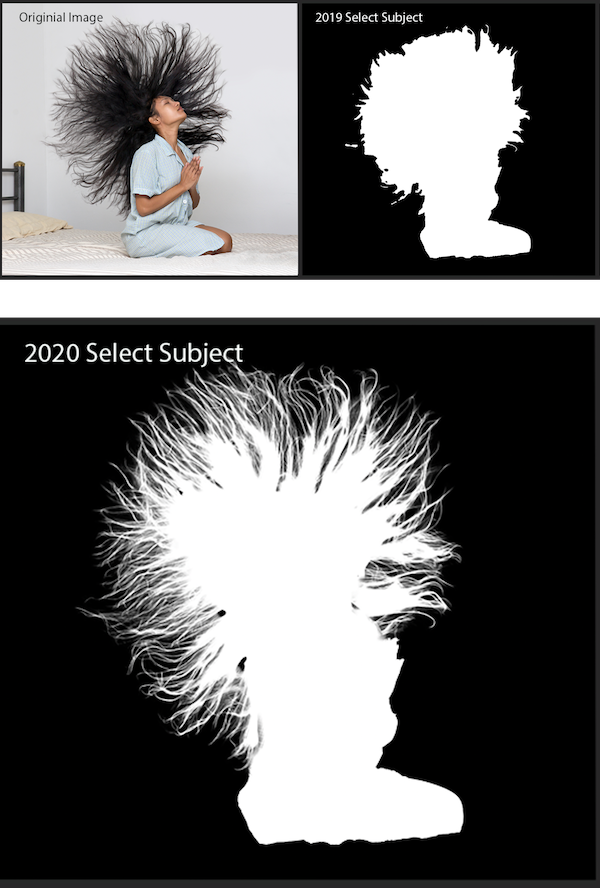
Image courtesy of Adobe
Here’s how the AI-driven Select Subject tool works.
Camera RAW
The RAW photo editor Camera RAW, featured in Photoshop, has received a facelift with a modern appeal. The UI was redesigned to look similar to the Lightroom app. It will now provide a seamless experience when users navigate within the app. The company has especially simplified navigation for image adjustments and batch processing in a more effective manner.
The Curves UI has also been updated, so it’s easier to use and visualize changes. The controls can now be placed vertically to minimize the effort to search for the functions you need when working on your project. Check out the video below to get a glimpse of the new changes.
Lightroom Classic
Lightroom Classic has improved its ‘Local Hue’ feature, which now comes with Hue control to Local Adjustments. This will allow users to easily work on skin tones, or accurately swap out entire colors in certain parts of the image.
The latest addition, ISO Adaptive Presets, will allow users to apply the same edit differently according to the ISO of the image that is being worked on.
Adobe has also added a Centered Crop Overlay for users to center their images. There are also improvements in the app’s performance when it comes to Library grid scrolling, Collection search, and filtering, as well as removing Develop sliders.
Get familiar with the latest features and upgrades below.
[via PetaPixel, images courtesy of Adobe]
Also check out these recent news


