
Adobe Introduces ‘Super Resolution’ AI Tool, Turning Low-Res Pics Into High-Res
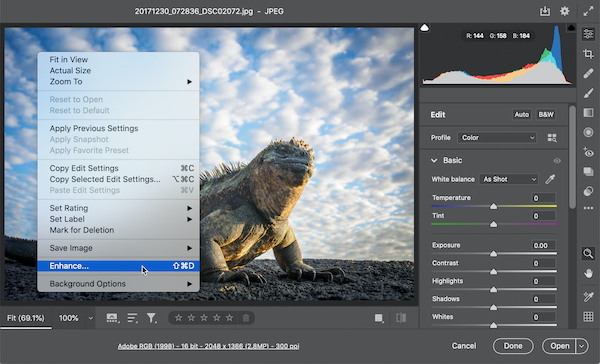
Image via Adobe Creative Cloud
Do you have an old photo from your travels that you really like but can’t print because it’s not sharp enough? Perhaps you’ve also got some group selfies stored in an old smartphone that won’t look that great after being compressed from social media uploading tools.
If you’ve suffered these problems before, Adobe’s new AI-powered ‘Super Resolution’ function—now available in Adobe Camera Raw 13.2 and heading to Lightroom and Lightroom Classic—could be a lifesaver.
To put it simply, Super Resolution enhances a photo’s quality by using machine learning to amp up its resolution. It is able to intelligently transform, say, a 10-megapixel photo into a 40-megapixel image, while cleanly preserving details and colors.
To train the AI, Adobe Research’s Michaël Gharbi and Richard Zhang and their team handed the computer millions of pairs of low-resolution and high-resolution image patches so it could learn how to enlarge and refine lower-quality images. “With enough examples covering all kinds of subject matter, the model eventually learns to up sample real photos in a naturally detailed manner,” explained Eric Chan, Senior Principal Scientist for Adobe Camera Raw.
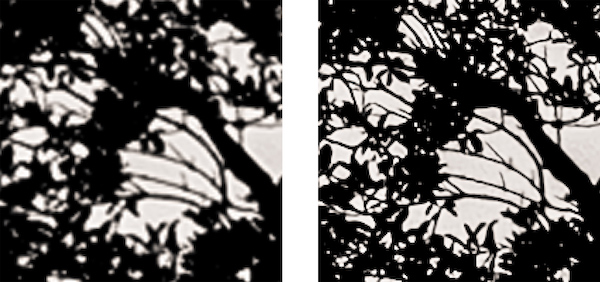
A cropped selection of a photo showing branches and foliage. Image via Adobe Creative Cloud
Super Resolution doubles a photo’s linear resolution, meaning that the enhanced version will have twice the width and twice the height of the original—amounting to four times the total pixel count of the original photo. In a few clicks, you can turn a 10-megapixel image into a 40-megapixel raw photo, and push a 16-megapixel photo up to 64 megapixels.
To access the tool, right-click on a photo and select Enhance. Under the Enhance Preview dialog box, simply tick the Super Resolution box and click Enhance.
Edits made to the source photo—whether JPEG, PNG, TIFF, or DNG—will be transferred to the new version, and you can then apply adjustments just as you would to a regular photo.
The implications for adopting this tool can be massive. Chan explained that since most smartphone cameras can only take 12-megapixel photos and that some cameras max out at 16 to 24 megapixels, “This is plenty for many scenarios, like posting online or sending to a friend. If you want to make a large print to display on your wall, though, extra resolution helps to keep edges clean and details intact.”
Super Resolution can handle images of up to 500 megapixels and images with widths of up to 65,000 pixels. Any higher than those figures and you’ll receive an error message.
“We’re looking into ways to raise these limits in the future,” shared Chan. “For now, don’t get too worried — a 500-megapixel file is still pretty darn big!”
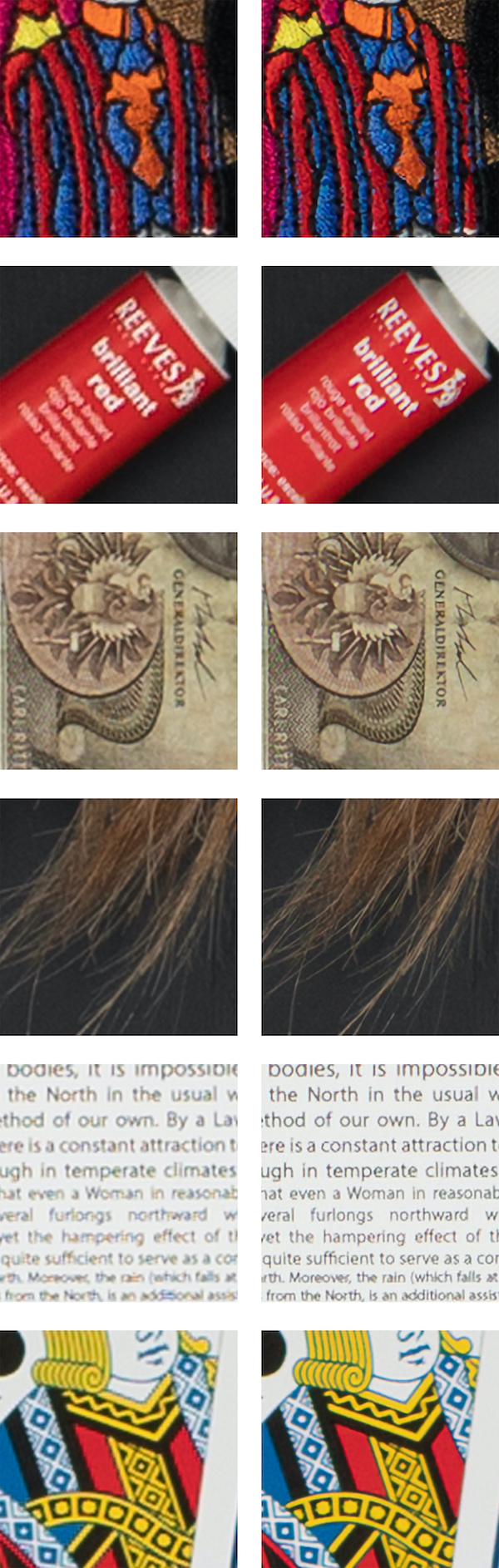
Cropped selections of a series of photos. Image via Adobe Creative Cloud
[via Adobe Creative Cloud]
Also check out these recent news


