
Adobe Photoshop Just Changed Up The ‘Save As’ Function After Decades
Image via Sharaf Maksumov / Shutterstock.com
Like many productivity apps, Photoshop offers a few different ways to save a project. There’s Save, Save As, and Export, but the May 2021 update for Photoshop on Desktop for Mac brings a new command: Save a Copy. Collect them all!
As confusing as it seems, version 22.4 of the desktop version for Mac throws in a function that could already be achieved with the Save As command for decades. Adobe explains in its release notes: “Save a Copy automatically creates a copy of your work and allows you to export and share in your desired file format like JPEG, EPS, and so on, without overwriting the original file and protecting your data in the process.”
The rationale behind this is pretty bizarre. The Save As command itself can no longer be used to save files as JPEGs. As such, anyone who wishes to change an image’s file type to a (now) unsupported format will need to save a copy.
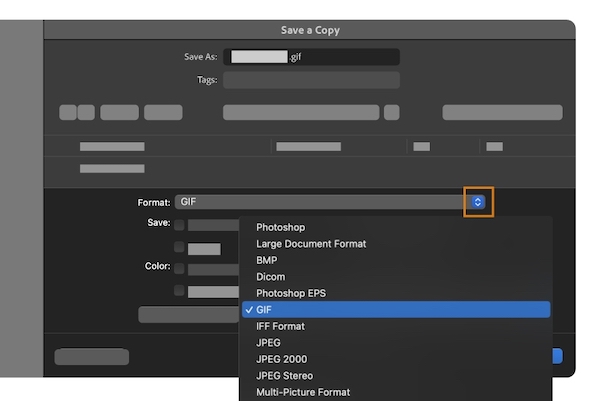
Image via Adobe
“With this new option, only supported files that maintain your work will be supported in the Save As command… If the file type you’d like to save isn’t an option, simply go to Save a Copy and create another version in your desired file type,” Adobe details.
With Save a Copy taking over some of the functionalities of Save As, and Save As now somewhat defaulting to what Save can do, the File drop-down menu appears a little more cluttered. Not to mention, the overlap in capabilities can be maddening.
Pressed by users baffled about the update, Photoshop product manager Stephen Nielson shared the real reason why there’s a new Save a Copy command. He revealed that Apple’s Mac update no longer supports the API for Adobe’s original Save As feature, so Adobe had to introduce an alternative.
Elaborating on the API change, a spokesperson for Adobe told PetaPixel, “The new Save a Copy option in the File dropdown menu of Photoshop addresses a change in macOS 10.15.x and later, which eliminated the ability to manipulate aspects of the Save As dialog.”
In other words, Photoshop couldn’t save Save As as is, and had to make a copy.
For the love of… @Photoshop @AdobeCare this is not necessary. Stop changing things that do not need to be changed. I do not want to Save a Copy, I do not want to have to manually remove “copy” from your file names. I just… no. (22.4.0) pic.twitter.com/V4UYTZOJvT
— Casey Kelley (@ckelley) May 14, 2021
Photoshop changed the functionality of "Save As" and no longer uses that to save JPEGs. To do that, you now have to use the "Save a Copy" option.
— Jaron Schneider (@jaronschneider) May 17, 2021
This bothers me.
Why do Photoshop have to change things that have been that way for decades? It takes me years to relearn them.
— Michael Goldrei (@number6ix) May 18, 2021
First it was the way things scale, and now I have to hit alt apple S instead of shift apple S to 'Save a Copy'.
It'll be 2024 by the time I've got used to this
Yes. The old behavior is no longer possible in macOS Big Sur because Apple removed the API we used. So we rebuilt the functionality as a new menu item, Save a Copy.
— Stephen Nielson (@strawbo) May 13, 2021
[via PetaPixel, images via various sources]


