
Remove Netflix Leeches With These Steps That Show Who’s Been Using Your Account

Image via sitthiphong / Shutterstock.com
Do you suspect that someone’s been freeloading your Netflix account? Or have your family and friends “borrowed” your login details years ago and overstayed their welcome?
If you’re planning on doing a purge and taking your Netflix account back, here’s how to do it, according to a recent how-to piece by Mashable.
First, sign into your Netflix account through your desktop, then hover over your profile picture and click on ‘Account’.
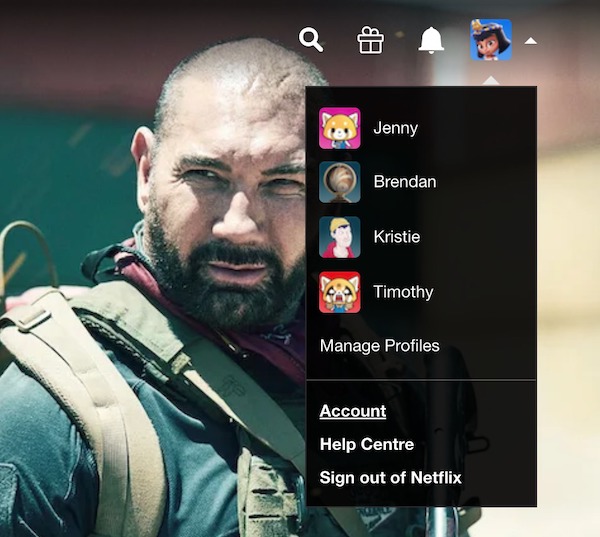
Screenshot via Netflix
If you’d like to see which devices have been using your account, select ‘Recent device streaming activity’.
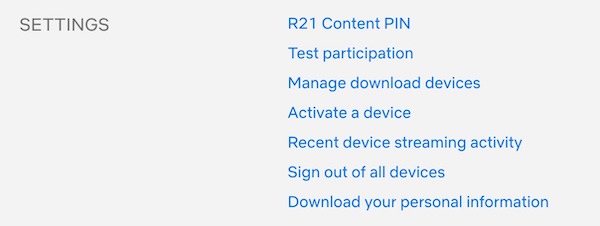
Screenshot via Netflix
After checking, if you wish to remove all other devices from your account, select ‘Sign out of all devices’. This will require you to log into your Netflix account again, but all other devices and third-party apps sharing your account information will also be removed.
And there you have it—no more pesky leechers messing up your Netflix recommendations.
[via Mashable, cover image via sitthiphong / Shutterstock.com]
Also check out these recent news


