
Google Trains AI To Upscale Tiny, Blurry Shots More Impressively Than Other Tech
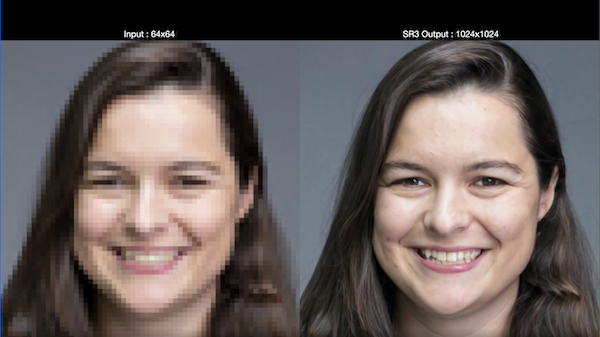
Image via Google AI Blog
While Google recently updated its Photos app with massive enhancement upgrades, it appears that it’s working on a much more powerful photography upscaling system that can turn tiny 64-pixel images into incredibly convincing, super-res photos.
The ways Google’s Brain Team does this are pretty intriguing. While most would imagine that upgrading an image’s quality goes something along the lines of enhance, enhance, enhance, the AI seemingly reduces the quality of a photo before adding boosters.
Detailing in a blog post on “High Fidelity Image Generation Using Diffusion Models” from July, which was recently picked up by DPReview, Google developed a new pair of AI tools to increase photos’ resolution via selective destruction and repair.
First up, the technology applies pure Gaussian noise to a low-res photo, and then sponges up all the grain with noise reduction in a step known as Super-Resolution via Repeated Refinements (SR3). This apparently leaves a result that’s four times the resolution of the original.
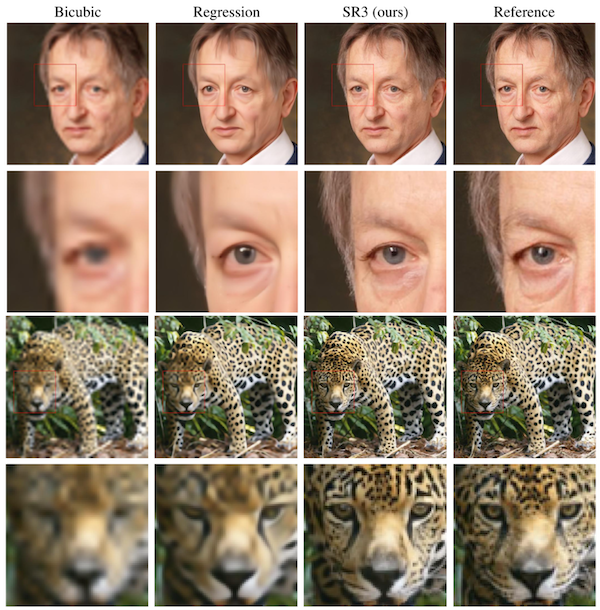
Image via Google AI Blog
It then fills the output image with more Gaussian noise and blur using Cascaded Diffusion Models (CDM) in what it calls “conditioning augmentation,” and repeats the process, ultimately creating a quality that beats existing AI upscaling techniques like BigGAN-deep and VQ-VAE-2 “by a large margin.”
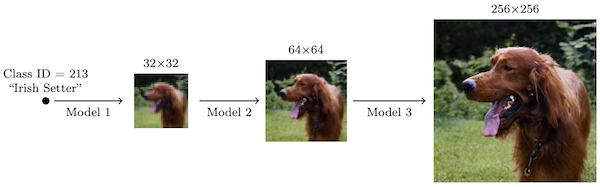
Image via Google AI Blog
All this sounds counterintuitive, and the video below illustrates how selective destruction might actually be practical.
Video via Google AI Blog
Google’s Brain Team explains that the super-resolution tool “achieves strong benchmark results… for face and natural images.” The AI is able to scale up low-resolution images by four to eight times, effectively transforming a 64 x 64-pixel photo into a remarkable 1,024 x 1,024-pixel picture.
Technology like this has great potential in restoring old family pictures and enhancing medical imaging, and thankfully, we’re already seeing a semblance of these tools in the Google Photos app.
[via DPReview and PetaPixel, images via Google AI Blog]
Also check out these recent news


