
Microsoft Ditches Passwords From Sign-In Process, Saving Countless Headaches
Image via BigTunaOnline / Shutterstock.com
Microsoft recognizes that passwords are becoming an increasingly backdated way to gain access to online accounts. Especially when that account is something like online banking, which holds information that you definitely don’t want others to see.
As Bret Arsenault, the Chief Information Security Officer at Microsoft, once said, “hackers don’t break in, they log in.” And that’s due to the secure-yet-not nature of passwords.
“Weak passwords are the entry point for the majority of attacks across enterprise and consumer accounts,” states Vasu Jakkal, Corporate Vice President of Security at Microsoft. “There are a whopping 579 password attacks every second—that's 18 billion every year.”
With a weak or familiar password, hackers can easily gain access to the account. With a strong and complex one, it’s a frustrating hassle to remember.
And if a password manager or tool gets infiltrated? Let’s not even think about that.
What would you rather do instead of resetting your password?
— Microsoft (@Microsoft) July 26, 2021
Hence the company’s latest announcement: all Microsoft users will now be able to eradicate the need for a password—forever.
Instead, alternative methods of authentication can be used. These come in the form of the Microsoft Authenticator app, Windows Hello, a security key, or a verification code sent to users’ phones to sign in.
This will be available over the following weeks across services such as Outlook, OneDrive, and Family Safety, among others.
To do this, users will first need to download and link the Microsoft Authenticator app to their accounts. Then, accessing Advanced Security Options in their account will lead to Additional Security Options. There, the option to turn on a Passwordless Account will be available.
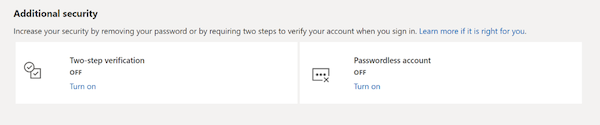
Image via Microsoft
Once the notification on the Authenticator app has been approved, the password is free to go. If users decide they prefer a password, though, the option to go back is always there.
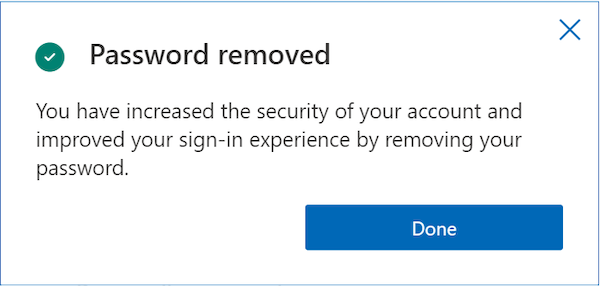
Image via Microsoft
Almost a third of people researched by Microsoft revealed that they’d rather stop using an account rather than deal with a lost password, according to the company’s announcement. Hopefully, this new feature is set to eliminate this inconvenience, perhaps forever.
The passwordless future is here. Learn more at https://t.co/LHJR2y1Vji pic.twitter.com/jGu6VR1iVL
— Microsoft (@Microsoft) September 15, 2021
[via TechRepublic, image via BigTunaOnline / Shutterstock.com]
Also check out these recent news


