
Google Chrome Takes You Deeper Into Your Past Searches With ‘Journeys’ Option

The web browser history has been long regarded as a forbidden land that would perhaps better be left untouched, but it also serves as a map of where on the internet we have been during our time on the World Wide Web.
Reinventing the notion of browser history is Google Chrome’s new feature, ‘Journeys’. This takes the user on a trip down memory lane, but also makes it easier to find something that may have been presumed lost to the internet void forever because they forgot the URL.
All users need to do is type a related word into the search bar and click on “Resume your research.” This will bring up a list of relevant sites, allowing for an easy return to research no matter where they left off. History can be grouped in this way even with activity from weeks ago.
All of these features can also be accessed via the new Chrome History ‘Journeys’ page.
“Let’s say you’re working on a project, and you need to find a specific article that you read online a few weeks ago,” Roger Huang, Director of Growth for learning platform Springboard, explains to Lifewire. “Normally, you would have to go through your search history to try and find the website address.”
“But with Google Chrome’s ‘Journeys’ feature, all you have to do is type in a keyword from the article, and Chrome will show you where it was originally published online.”
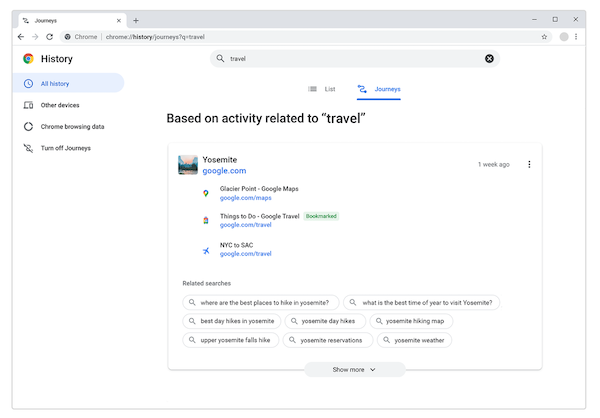
There are also features in place to optimize this search. Chrome will factor in how much time was spent on a particular site and use this information to present the most relevant information “front and center” while suggesting other related searches that could enhance the experience.
Google explains in a blog post that only device history is grouped, and nothing is linked to the user’s Google account. With more development, the option to access ‘Journeys’ via multiple devices may be added in the future “based on user feedback and interest.”
Chrome has been the center of a few privacy debacles previously, so it’s understandable why some may be wary. There is the option to delete individual items or activity clusters, Google assures, and users can also opt out of this entirely.
[via Lifewire and How-To Geek, images via Google]


