
Spotify Refreshes Its Desktop App With Updated Library, ‘Now Playing’ Sections
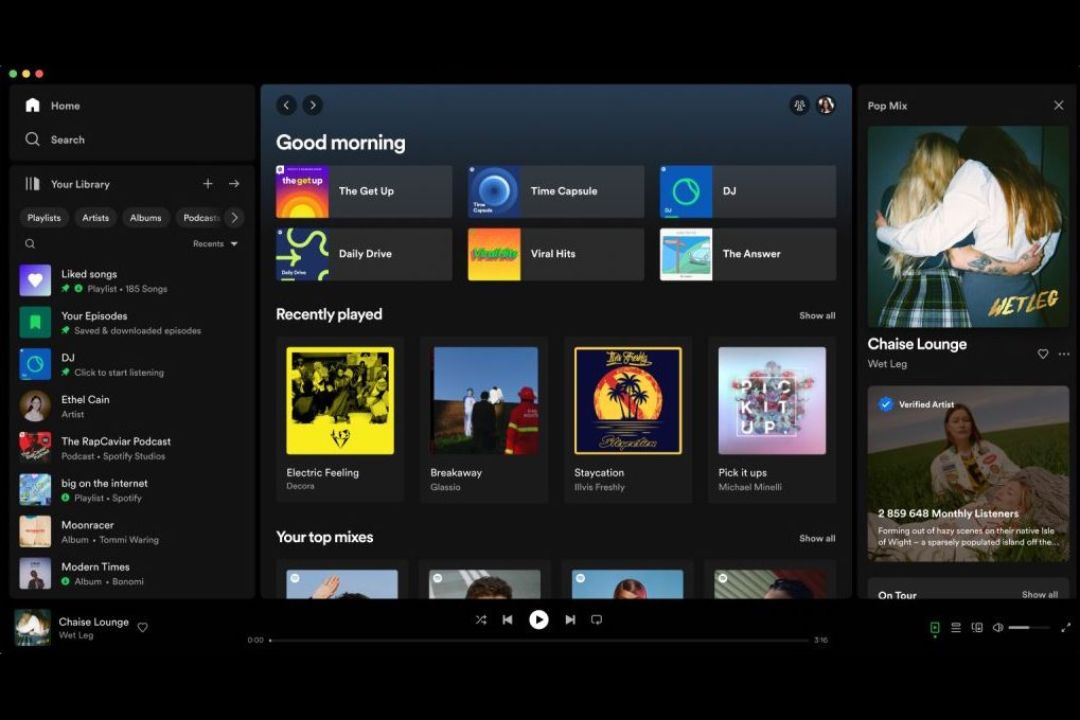
While millions of listeners enjoy music through Spotify’s mobile applications daily, its desktop application can seem pretty clunky to use. Thankfully, the streaming service has recently updated its look in what it’s calling “one of the biggest revamps yet.”
Upon opening the application on a PC or laptop, users will still see the same browsing options, recommended songs, and podcast episodes, but now with a brand-new ‘Your Library’ segment on the left of the screen and ‘Now Playing’ on the right.
The former allows for one to immediately access saved music or podcast collections, so there’s no longer any need for multiple clicks before getting to a particular song or playlist. For those who don’t like too much clutter, there’s also the option of collapsing all the sections for a more minimalist view.
Video via Spotify
For the ‘Now Playing’ segment on the right of the screen, individuals can get a glance at what’s currently playing, alongside biographical information of the artist they’re listening to. If merchandise or upcoming tour dates are available, they’ll also be displayed together with the song.
Those thinking of bringing ‘Friend Activity’ back to the main launch page can head over to the “friends” icon next to the user profile picture at the top-right corner and drag and drop the feed back into its rightful position.
Last but not least, Spotify has made it possible for users to search and switch through dedicated playlists, podcasts, and audio feeds just within one’s library instead of having to type the names into the search bar.
[via Engadget and Apple Insider, cover image via Spotify]


