
Google Slides Make Presentations More Engaging With New Real-Time Annotations
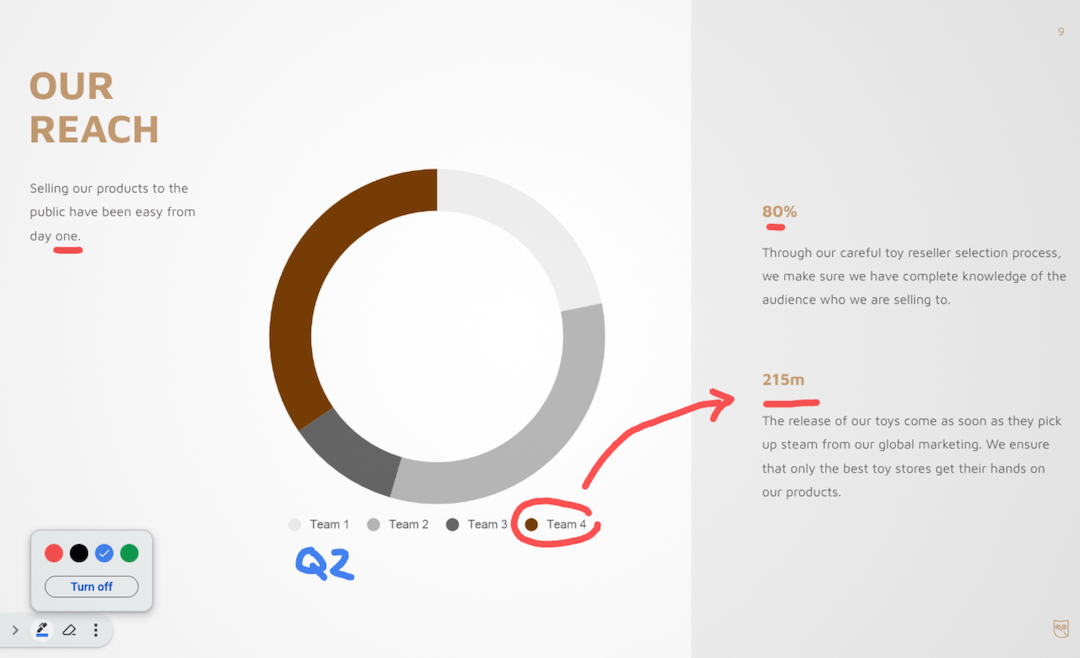
Google’s latest update could be a game-changer for Slides. Now, presenters can add annotations directly to their slides, enhancing engagement and impact in real time.
The newly-introduced pen tool empowers users to do more than just display text and images. It allows one to underline, circle, make quick notes, or even draw connections right on the presentation.
Be it a crucial board meeting or a creative brainstorming session, these on-the-go annotations could help bring a new level of interactivity to presentations.
To tap into this feature, individuals can simply open their presentation in “slideshow mode” and hover over the bottom-left side of the viewer.
Click on the ellipsis icon to access a three-dot menu and select “turn on the pen.” This will then unlock the feature, allowing one to emphasize content and make presentations more dynamic.
And if there’s a need to correct the annotations, the eraser tool is located at the bottom left viewer menu, allowing for seamless adjustments.
The tool is being made available to all Google Workspace customers and users with personal Google Accounts. Head here for more information.
[via 9to5Google and Android Police, cover image via Google Workspace Updates]
This article was crafted with assistance from an AI engine, and has been manually reviewed & edited.


