Don't miss the latest stories
Advertise Newsletter
Network
  • The Creative Finder
  • The Bazaar
  • Deals
  • Status Is Down
Community
  • Sign up / Log in
  • Discussion Forums
  • Calendar of Events
NEW

Follow

Share this

Apple
Gadgets
iOS
Laptops
macOS
Product Design
Productivity
More
  • Redesign
  • Smartphones
  • Tablets
  • Tech Updates
  • Technology
  • UI/UX
  • visionOS
  • Web Design
  • Laptops
  • macOS
  • Product Design
  • Productivity
  • Redesign
  • Smartphones
  • Tablets
  • Tech Updates
  • Technology
  • UI/UX
  • visionOS
  • Web Design
MENU
  • Advertise with us
  • Submit tip/feedback
  • Work with us
  • Subscribe to newsletter
  • Subscribe to RSS
Advertise here
Advertisement

Apple Creates ‘Manuals, Specs & Downloads’ Site For Hassle-Free Help

By Mikelle Leow, 22 Mar 2024

Subscribe to newsletter
Like us on Facebook

Photo 92980113 © Chalermphon Kumchai | Dreamstime.com


No more frantically searching through the mess of instruction manuals in your drawer, because Apple has unveiled a one-stop shop for all your product needs.


The new Manuals, Specs, and Downloads webpage is a centralized hub of information previously scattered across the labyrinthine Apple Support website. From iPhones and iPads to Macs, Apple Watches, HomePods, and the new Vision Pro, users can now navigate a streamlined interface with clear categories for the device they need to know more about.
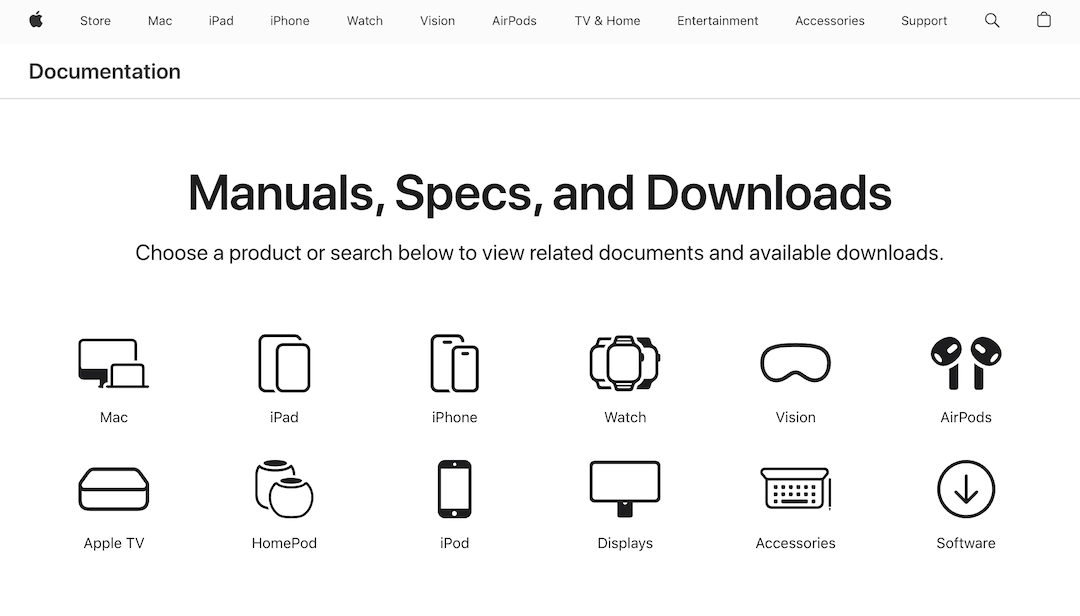
 

Screenshot via Apple

Advertisement
Advertisement


This library encompasses resources such as user guides offering step-by-step instructions for operating your device, along with detailed technical specifications that delve into the hardware and software components under the hood. Plus, you’ll find easy access to the latest software updates and operating systems to keep your device running smoothly, as well as repair manuals.


To accelerate the experience, the page includes a handy search tool where you can type in relevant keywords to discover specific support documents and information you need.


This reorganization not only saves time but also simplifies the process of finding urgent resources—whether you’re troubleshooting an issue, exploring the full functionality of your device, or simply keeping it updated.


[via Slashdot and MacRumors, images via various sources]

   To discuss this topic, please click here.
Receive interesting stories like this one in your inbox
Advertise here

More related news

Advertise here
Also check out these recent news
Web Design
Link to news page

When Your Website Goes Down, This Is the Page Customers Meet Instead

2027
Link to news page

2027 Already Has A Color Of The Year And It’s Beginning On ‘Grounded’ Territory

IKEA
Link to news page

IKEA & Xbox Press Play On Furniture & Storage Inspired By The Iconic Controller

Fashion
Link to news page

Vogue Presents ‘United Flags of Fashion’ With Top Designers For All 50 States

Coca-Cola
Link to news page

Coca-Cola Pours Fresh Life Into Its Iconic Branding With Worldwide Redesign