
Adobe Illustrator Now Lets You Dream Up Vectors From Text, Test-Drive Mockups

Image courtesy of Adobe
Adobe Illustrator and vectors are almost synonymous with one another, and now it’s making them more prevalent with ‘Text to Vector Graphic’, one of the impressive new features recently introduced in light of the Adobe MAX creativity conference.
With Text to Vector Graphic, available on the desktop version of Illustrator, you can now transform a simple text prompt into a stunning vector graphic effortlessly, thanks to the power of Adobe’s popular and ethical Firefly art-generating AI.
This update comes hot on the heels of Illustrator’s Generative Recolor, which uses the generative AI model to create color palettes instantly.
By simply entering a text prompt, you can now churn out professional-grade vectors like icons, scenes, objects, and patterns—complete with precise and smooth curves—Adobe details. For designers, this will dramatically streamline the transition from idea to design exploration.

Image courtesy of Adobe
Vectors crafted using Text to Vector Graphic are fully editable and scalable, layered and organized into groups for easy reuse. For instance, if your artwork includes a tree, all related paths making up that tree will be logically grouped together and layered for tweaking, editing, and reusing in the near future.
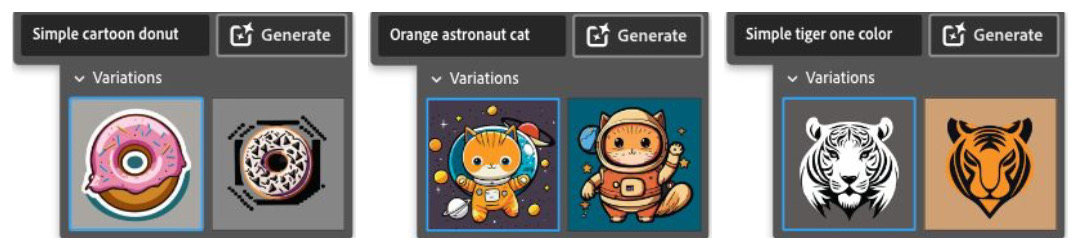
Images via Adobe
Further, gradients can be created more effortlessly as the model simplifies the geometry to generate editable vector gradients, eliminating the need for multiple solid-filled paths.
Vectorized patterns produced by Text to Vector Graphic are also seamlessly tileable, allowing for infinite repetitions without visible gaps.
Since it’s powered by Firefly, Text to Vector Graphic’s inputs are trained on Adobe Stock, openly-licensed, and public-domain content, producing curation-quality outputs that are also commercially safe. For transparency and peace of mind, Adobe has added Content Credentials to files generated with Text to Vector Graphic so users can track when an image was created or edited using Firefly’s generative AI technology.
Text to Vector Graphic’s applications include the rapid creation of fully editable assets for marketing and advertising materials, such as social ads, banners, brochures, posters, and trade show signage, all from a simple text prompt. Designers can also use it to build brand identities, create mood boards, and explore different variations of logos and brand assets.
Beyond this, Adobe has introduced other intriguing tools, such as Mockup, to Illustrator. This feature allows users to quickly and easily visualize “real-life” mockups of their graphics—including their logo, artwork, or any other graphic—directly and non-destructively within the app to see how their designs would look when applied to various surfaces or objects.

Image via Adobe
You can choose from Adobe’s curated stock content or import your own images for mockups. The vector graphic auto-adjusts onto the image, providing a realistic preview of how your designs would appear in real life. This feature is particularly useful for designers working on branding, product packaging, apparel, and signage. By offering a visual context for your designs, Mockup aims to help designers make informed decisions and present their work more effectively to clients.
Another addition, Retype, turns static rasterized text into editable text by using Adobe Fonts to identify similar fonts to those used in the imported text or outlines, eliminating the need to sift through thousands of fonts manually and saving valuable time. You can then convert the text and make it editable. Both Mockup and Retype are in beta and are expected to improve following user feedback.
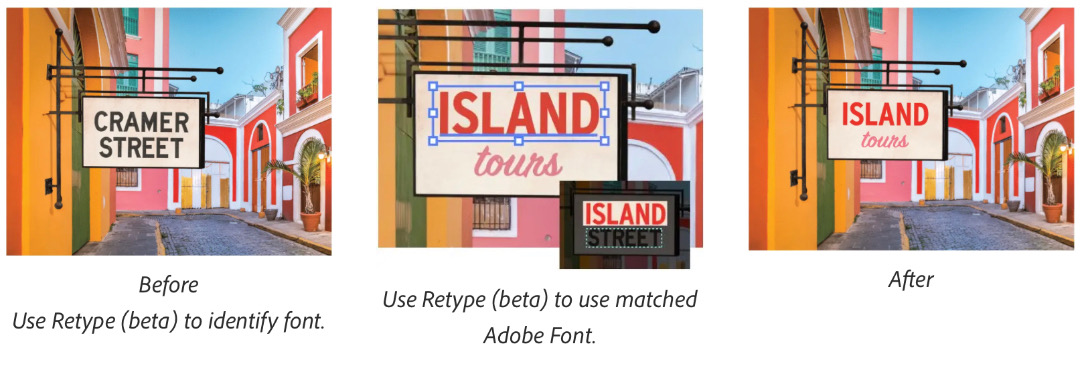
Screenshot via Adobe
To try out all these features in beta, simply update Adobe Illustrator to the latest version.
In related news, Adobe Firefly is now more powerful than ever.
[via Adobe]
This article was crafted with assistance from an AI engine, and has been manually reviewed & edited.


