
Adobe Could Be Training AI With Your Images If You Haven’t Opted Out

Photo 251414371 © Piotr Swat | Dreamstime.com
If you’re wondering how AI tools appear to get more powerful overnight, the answers could be right under your nose this whole time. You may have accidentally enabled permissions to help artificial intelligence gain its smarts, or probably opted into these programs by default.
Adobe’s technology just keeps getting more intuitive by the year, and it’s no secret that it can improve this dramatically with the help of user analytics and feedback. What many subscribers are astonished by, however, is the fact that the company automatically collects their images to train its artificial intelligence and machine-learning models.
As discovered by users including Iceland-based web developer Baldur Bjarnason, Adobe added a ‘Content Analysis’ section to its Privacy and Personal Data page disclaiming that the firm “may analyze your content using techniques such as machine learning (e.g., for pattern recognition) to develop and improve our products and services,” unless a user has actively opted out of the data collection.
It’s unclear when the section was introduced but, as PetaPixel points out, it could have been as far back as the middle of last year since the FAQ page on Content Analysis was last updated on August 10, 2022.
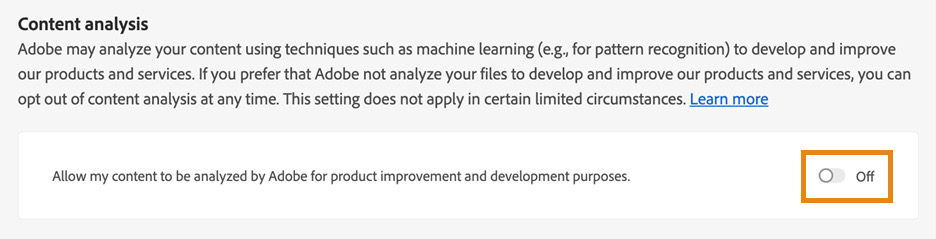
Adobe adds that, although the option is enabled by default, users can opt out of their work being used to train AI “at any time.”
Content that Adobe may analyze to “develop and improve our products and services, enabling us to deliver innovative and cutting-edge solutions” includes image, audio, video, text, and document files on the Creative Cloud and Document Cloud servers, but not files stored or processed locally on your device. That means your work will have to have entered Adobe’s servers to be a part of its Content Analysis system.
Still, “that’s basically every picture ever uploaded into Lightroom,” notes Bjarnason, who uses the software to sync photos from his Windows desktop to his iPad.
Heads up: Adobe opts your work into AI scraping by default. You can opt out in Privacy Settings. pic.twitter.com/GD6IXkVFsU
— stu.psd (@astronaughtyart) January 4, 2023
To opt out of Content Analysis, log into your Adobe account, click on your profile picture on the top right corner, and then select ‘View Account’ and ‘Edit Profile’. Find the ‘Privacy and personal data’ section on the left menu, and scroll down to toggle off ‘Content analysis’.
DP Review’s Gannon Burgett has a step-by-step video demonstrating how to opt out of the program:
Adobe does note that opting out doesn’t apply “in certain limited circumstances,” such as if a user has volunteered to be in a beta or pre-release program or uploaded photos for sale on Adobe Stock.
Had the auto-opt-in feature been discovered just six months ago, it probably wouldn’t have caused such a recoil. The landscape is a lot different now with the explosion of tools like DALL-E and Midjourney, as creatives now have visual proof where their work may end up.
The rapid rise of text-to-image generators has spurred quite the frenzy. While they’ve been lauded by some to be the future of creativity, they’ve also raised concerns about copyright infringement. AI art is a sum of billions of original works used to train its algorithm, making it difficult for individuals to prove if their work was “stolen” by the machine.
Under pressure by users, DeviantArt added the ability to opt out of “deviations” created by its proprietary art generator.
There are, of course, people who wouldn’t mind volunteering their work to help their favorite programs get more advanced. However, judging by the current landslide reaction creators have about AI art generators, it would seem that companies are compelled to make data collection permissions opt-in by default, for fear that there wouldn’t be enough data to train algorithms.
Adobe explains why
“Machine learning-enabled features can help you become more efficient and creative,” Adobe justifies. “For example, we may use machine learning-enabled features to help you organize and edit your images more quickly and accurately. With object recognition in Lightroom, we can auto-tag photos of your dog or cat. In Photoshop, machine learning can be used to automatically correct the perspective of an image for you.”
Adobe elaborates that the processing of user images could also help to develop content-aware suggestions.“For example, if you’re working on a UI mock-up, Adobe XD might automatically suggest certain buttons. This content-aware suggestion can become more relevant to your work when Adobe XD learns from your specific usage and content. Content-Aware Fill in Photoshop also analyzes your image and predicts the correct content to insert in a selected area.”


